The Super Administrator account in WIN7 and later is disabled by default. It is a built-in account which we cannot access for security reasons. However, we may need the super administrator account for carrying out troubleshooting operations, testing some potentially harmful software or carrying out networking tasks such as running apache servers which require admin privileges.
Now the question is, Does this super administrator account has more privileges than a normal administrator account.
Answer: Yes, of course
Here is a step by step guide to do that
Step 1: Open cmd by typing cmd on start menu search bar and running it as an administrator.
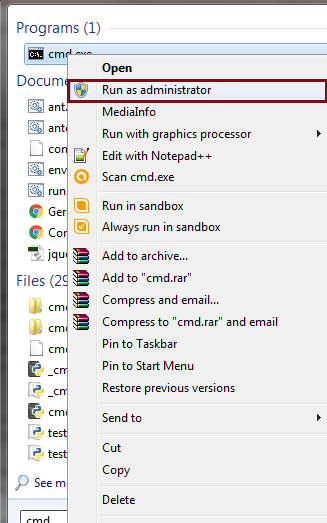
Step 2: In the command prompt type net user

As you can see there are two users one Administrator and another one is your user name.
The Administrator account is disabled by default. So, we are going to enable it by typing in the command prompt
net user administrator /active:yes

Now the admin account is having no password and any one can access it. Hence we are going to give a password by typing
net user administrator *

Note: using this technique you can change the password of any user by typing(Asterisk will not appear in this case)
net user username *
for example my pc username is Ayush
hence, I will be typing, net user Ayush *
To disable the admin account type
net user administrator /active:no

Next time when you restart your pc you will get two accounts. One consisting of username and another consisting of the administrator as shown in the pic below.

Using administrator account you don’t have to run programs in admin mode by right clicking every time because all the programs running inside the admin account are running in admin mode by default.

 TechnoSparkz